The Onboarding Process
The pre-mission, integration phase is called Onboarding.
Typical Work Items:
- The collection of information about satellite radio by Infostellar
- The sharing of information about the ground station with the user
- The selection of ground stations to use by the user
- The filing of ITU applications by either the user or Infostellar
- The creation of user accounts and assets in StellarStation by Infostellar
- The introduction of users to StellarStation browser tools by Infostellar
- The connection of the satellite mission control software to StellarStation for automated satellite mission operations
- The inclusion of StellarStation into satellite operational procedures by the user
- The testing of satellite mission operations and software with StellarStation in-the-loop
The collection of information about satellite radio by Infostellar
Infostellar will request that the satellite team understand their radio and to provide relevant documentation about the radio. This includes information such as intended usage during the mission, specifications, ICDs, etc.
The sharing of information about the ground station with the user
Infostellar will share information about the ground station with the satellite team. This includes information like the location, general availability, price, supported frequencies, etc.
The selection of ground stations to use by the user
The satellite team must choose the ground stations they want to use. It is highly encouraged to do this as early as possible.
Consider:
- Communication channels used (RF, Optical, etc)
- How much data needs to be moved
- How often data needs to be moved
The filing of ITU applications by either the user or Infostellar
The satellite will require proper ITU filings to operate. These filings can be made by the satellite team or with the assistance of Infostellar.
The creation of user accounts and assets in StellarStation by Infostellar
Infostellar staff will create the relevant assets in StellarStation (organization, satellite, channels, etc) and add users to the organization.
The introduction of users to StellarStation browser tools by Infostellar
Infostellar staff can introduce the users to StellarStation by refering them to this guide, walking them through the browser tools, and answering any questions the users may have.
The connection of the satellite mission control software to StellarStation for automated satellite mission operations
The satellite team must integrate with StellarStation via the CLI or API if they intend to automate operations. Infostellar staff can assist with this process.
The inclusion of StellarStation into satellite operational procedures by the user
The satellite team must consider StellarStation services and procedures when creating their own operational procedures. It is highly encouraged to ask for advice from Infostellar staff about how best to include StellarStation in operational procedures.
The testing of satellite mission operations and software with StellarStation in-the-loop
It is highly encouraged that the satellite team include StellarStation in-the-loop during testing of any integrated software and runthrough of operational procedures.
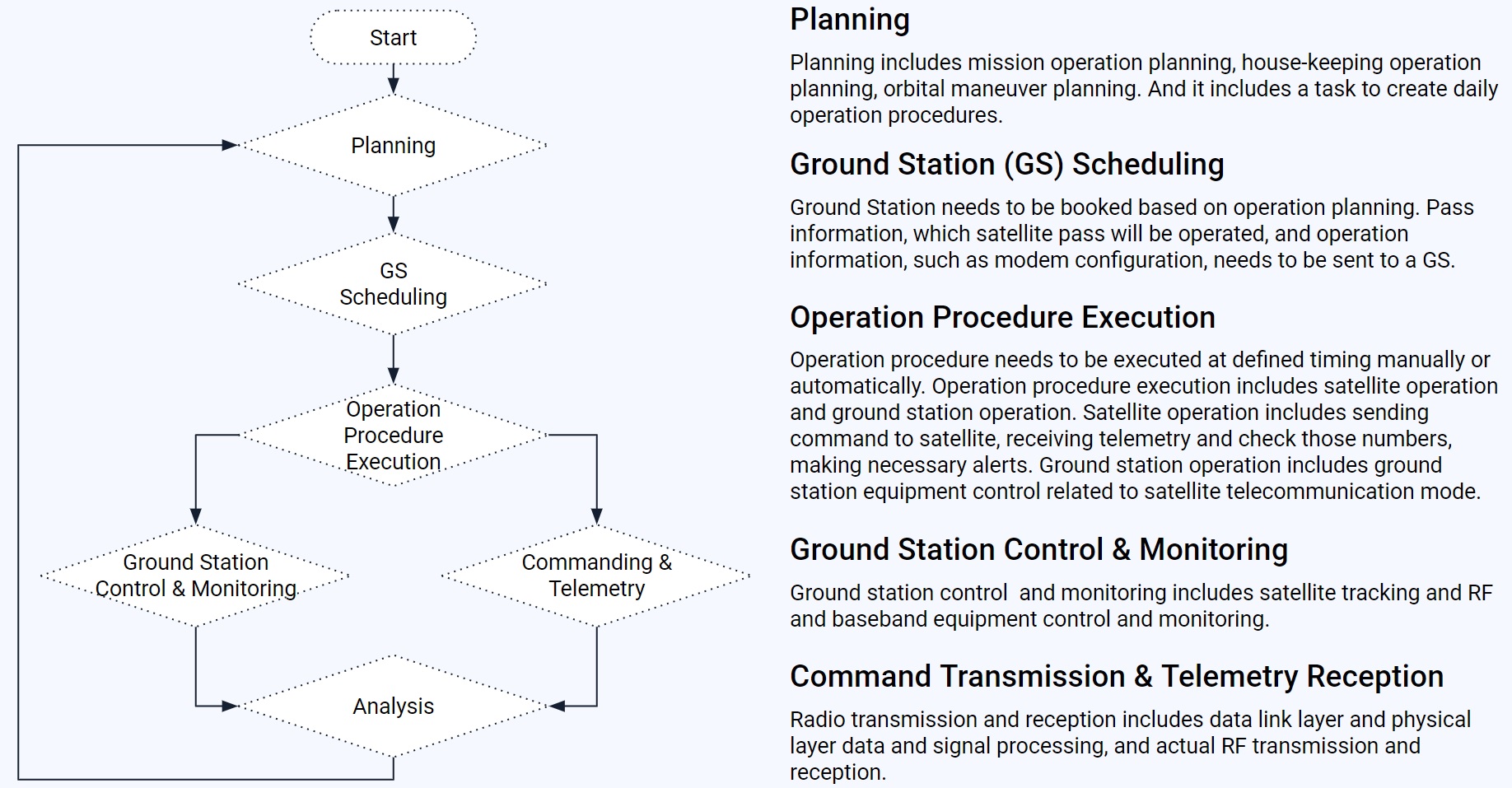
Generalized Satellite Operation Flow
Your team probably already has a good idea of how operations might work, but here is an example anyway:
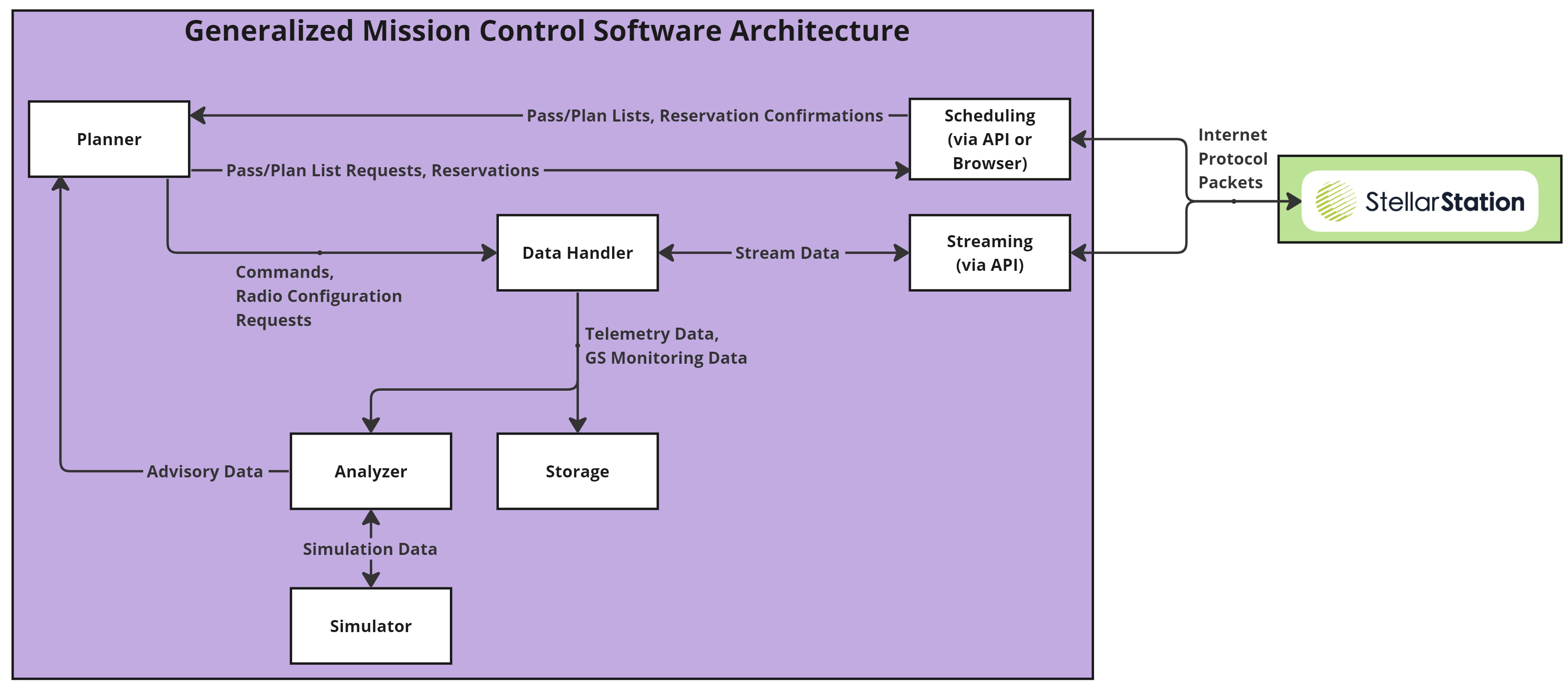
Generalized Mission Control Software Architecture
Your team probably already has a good idea of how the MCS should work, but here is an example anyway:
Commonly Used API Services
- AddTle(): Adds a new TLE to StellarStation for the satellite.
- GetTle(): Gets the TLE that is registered in StellarStation for the satellite.
- SetTleSource(): Set the TLE source to automatic (pulled from NORAD) or manual (updated by you).
- ListUpcomingAvailablePasses(): Gets a list of upcoming passes that are available for reservation.
- ReservePass(): Reserves a pass (becomes a "plan") during which communications may occur.
- ListPlans(): Gets a list of plans for the satellite.
- CancelPlan(): Cancels a plan for the satellite.
- OpenSatelliteStream(): Opens a bidirectional stream. Commands and ground station configuration requests can be sent. Telemetry, event, and ground station monitoring data can be received.
API Usage Tips
- Log usage
- Handle errors
- Test well and often
- Make use of ground station monitoring data