About this Guide
This is Infostellar's publicly available Satellite Operator's Guide to StellarStation. This content is exclusively owned by Infostellar. Any alteration, reproduction, disclore, or distribution of this content is strictly prohibited without the express written permission of Infostellar.
This content may be updated without prior notice.
Goals
- To educate readers about GSaaS and StellarStation.
- To clearly identify the terminology Infostellar staff use when discussing services with users.
- To inform users about the onboarding process.
- To educate users on how to use StellarStation.
- To offer advice about testing and integration.
- To answer frequently asked questions.
About GSaaS and StellarStation
Ground Segment as a Service
Ground Segment as a Service, or GSaaS, is the provision of ground segment infrastructure over the internet as a service.
These services can be remotely accessed by satellite operators for use during the satellite mission.
StellarStation
StellarStation is Infostellar's GSaaS offering. It is a unique cloud-based platform that provides satellite operators easy access to an expansive and ever-growing network of ground stations around the world. Users can interface with StellarStation via the browser, the CLI, or the API.
Features
- Single integration and validation effort for satellite operator to access our global network of ground stations
- Single contract for the network of networks of ground stations
- Single interface to book any Ground Station, to send commands, and to receive telemetry.
- Utilizing enterprise grade cloud-based services for data delivery rather than paying for elaborate and redundant global network infrastructure
- A large set of ground station locations supporting multiple frequency bands
- Better value passed to satellite operators by avoiding large capital expenditures on ground stations.
Functionality
StellarStation can essentially be broken down into Scheduling and Streaming functionality.
Scheduling
Your team will need to effectively make use of StellarStation's scheduling tools to make contact with your satellite during operations.
Streaming
Your team will need to effectively make use of StellarStation's streaming tools to send and receive data during operations. In addition to your satellite's data, there is also antenna monitoring data, should you need it.
Terminology and Definitions
| Term | Definition |
|---|---|
| Actuator | A hardware component that physically moves the antenna(s) to point in a desired direction |
| Channel | A communication configuration (regardless of medium) that defines how the data is transfered between the Satellite and Ground Station |
| Downlink | The communication pathway (regardless of medium) over which data is transfered from the Satellite to the Ground Station |
| Ground Station | The actual ground resource being used. The hardware involved is antenna/optical terminal, modem, ACU, etc |
| Modem | A device that converts between analog and digital signals for communication |
| Orbit Data | Data that describes the orbit of the satellite (typically a TLE) |
| Pass | A pass is when a spacecraft is physically overhead and in view of the ground station but does not have a reservation to make contact |
| Plan | A plan is when a spacecraft is physically overhead, in view of the ground station, and has a priority-based reservation to make contact |
| Satellite | The satellite communicating with the ground station |
| Site | The location of the Ground Station |
| Uplink | The communication pathway (regardless of medium) over which data is transfered from the Ground Station to the Satellite |
The Onboarding Process
The pre-mission, integration phase is called Onboarding.
Typical Work Items:
- The collection of information about satellite radio by Infostellar
- The sharing of information about the ground station with the user
- The selection of ground stations to use by the user
- The filing of ITU applications by either the user or Infostellar
- The creation of user accounts and assets in StellarStation by Infostellar
- The introduction of users to StellarStation browser tools by Infostellar
- The connection of the satellite mission control software to StellarStation for automated satellite mission operations
- The inclusion of StellarStation into satellite operational procedures by the user
- The testing of satellite mission operations and software with StellarStation in-the-loop
The collection of information about satellite radio by Infostellar
Infostellar will request that the satellite team understand their radio and to provide relevant documentation about the radio. This includes information such as intended usage during the mission, specifications, ICDs, etc.
The sharing of information about the ground station with the user
Infostellar will share information about the ground station with the satellite team. This includes information like the location, general availability, price, supported frequencies, etc.
The selection of ground stations to use by the user
The satellite team must choose the ground stations they want to use. It is highly encouraged to do this as early as possible.
Consider:
- Communication channels used (RF, Optical, etc)
- How much data needs to be moved
- How often data needs to be moved
The filing of ITU applications by either the user or Infostellar
The satellite will require proper ITU filings to operate. These filings can be made by the satellite team or with the assistance of Infostellar.
The creation of user accounts and assets in StellarStation by Infostellar
Infostellar staff will create the relevant assets in StellarStation (organization, satellite, channels, etc) and add users to the organization.
The introduction of users to StellarStation browser tools by Infostellar
Infostellar staff can introduce the users to StellarStation by refering them to this guide, walking them through the browser tools, and answering any questions the users may have.
The connection of the satellite mission control software to StellarStation for automated satellite mission operations
The satellite team must integrate with StellarStation via the CLI or API if they intend to automate operations. Infostellar staff can assist with this process.
The inclusion of StellarStation into satellite operational procedures by the user
The satellite team must consider StellarStation services and procedures when creating their own operational procedures. It is highly encouraged to ask for advice from Infostellar staff about how best to include StellarStation in operational procedures.
The testing of satellite mission operations and software with StellarStation in-the-loop
It is highly encouraged that the satellite team include StellarStation in-the-loop during testing of any integrated software and runthrough of operational procedures.
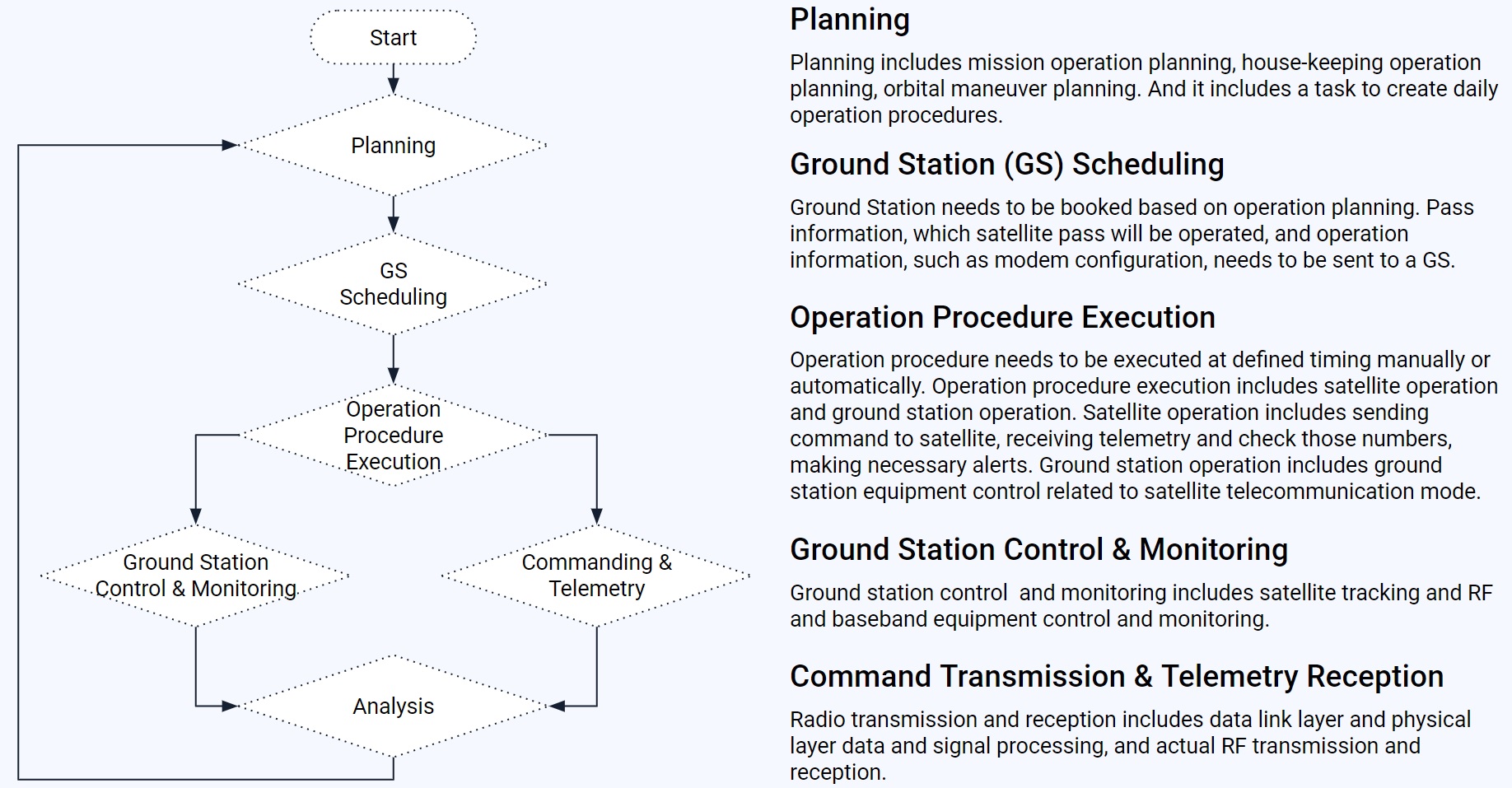
Generalized Satellite Operation Flow
Your team probably already has a good idea of how operations might work, but here is an example anyway:
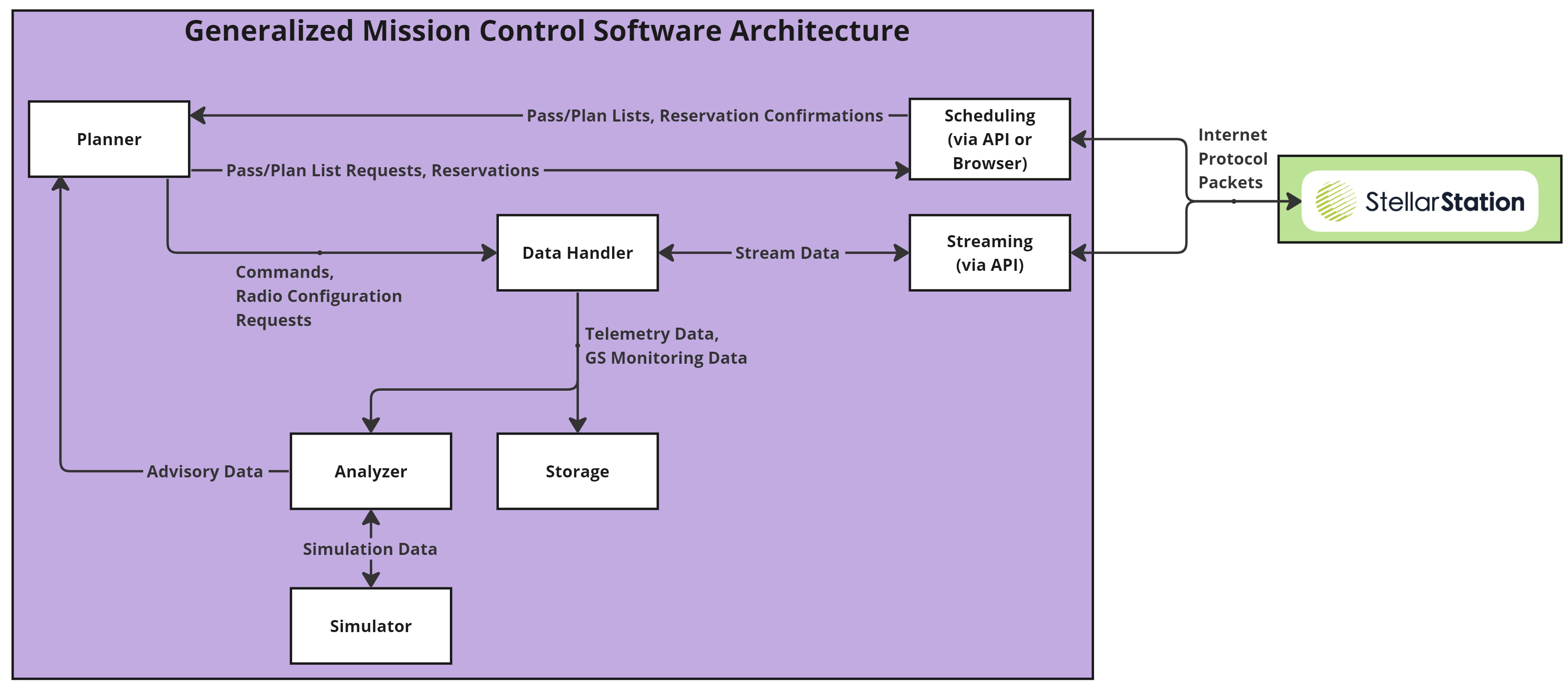
Generalized Mission Control Software Architecture
Your team probably already has a good idea of how the MCS should work, but here is an example anyway:
Commonly Used API Services
- AddTle(): Adds a new TLE to StellarStation for the satellite.
- GetTle(): Gets the TLE that is registered in StellarStation for the satellite.
- SetTleSource(): Set the TLE source to automatic (pulled from NORAD) or manual (updated by you).
- ListUpcomingAvailablePasses(): Gets a list of upcoming passes that are available for reservation.
- ReservePass(): Reserves a pass (becomes a "plan") during which communications may occur.
- ListPlans(): Gets a list of plans for the satellite.
- CancelPlan(): Cancels a plan for the satellite.
- OpenSatelliteStream(): Opens a bidirectional stream. Commands and ground station configuration requests can be sent. Telemetry, event, and ground station monitoring data can be received.
API Usage Tips
- Log usage
- Handle errors
- Test well and often
- Make use of ground station monitoring data
How to Use StellarStation
StellarStation makes scheduling and operating many passes, across many satellites, across many ground stations easy.
Typical Scheduling Flow:
Typical Operations:
- Getting Satellite Telemetry
- Sending Satellite Commands
- Getting GS Monitoring Data
- Configuring the GS Modem
Other:
Managing Orbit Data
Orbit data describes the orbit of the satellite (typically a TLE). Orbits are dynamic which means that the orbit data must change frequently to reflect these changes as well. This can be done automatically or manually.
Automatically Updating Orbit Data
If automatically updating the orbit data, your team can leave the responsibility of updating orbit data to StellarStation with a toggleable setting through any of the interfaces. StellarStation will use the latest TLE from NORAD for the spacecraft.
Manually Updating Orbit Data
If manually updating the orbit data, your team can send StellarStation a TLE in text format via any of the interfaces. StellarStation will use that TLE for future passes.
Drift
TLEs that were once accurate can rapidly become out-of-date. Every time the TLE is updated, drift may occur. How this affects your passes depends on how severe the drift is. After TLE updates, StellarStation will automatically attempt to match your existing reservations with passes generated from the new TLE. If a match is found, no problem. If a match is not found, then the pass will become "Drifted" and action must be taken by the satellite operator to reschedule the pass.
Orbit drift...
- May cause pass start/stop times to shift around
- May cause pass duration to increase or decrease
- May cause the tracking path to change
- May cause the maximum elevation to change
- May cause any or all of the above
Checking Availability
Availability is determined using the latest orbit data. If the TLE changes, then so do the available upcoming passes.
Requesting Available Passes
A list of available passes can be obtained from all StellarStation interfaces. Related information can also be found for each pass such as the ground station name, location, estimated AoS, estimated LoS, channels, and more. From this, satellite operators then reserve the needed pass as a plan.
Unavailability
Ground stations may have blocks of unavailability in their schedule.
Even if the satellite is visible during such a time, if the ground station is unavailable at that time, then the pass will not be available for reservation.
Even if the satellite has a reservation at such a time, if the ground station becomes unavailable at that time, then the plan will be canceled or marked as in-conflict.
Unavailability may occur...
- Due to a higher priority reservation being created
- Due to a higher priority reservation drifting into the desired time
- Due to outages
- Due to scheduled maintenance
- Due to emergency operations
Priority
Satellites on the ground segment have varying levels of priority. Consult your contract for more information about your mission's priority level and contact Infostellar staff if you have any questions.
Conflict
Another high priority reservation or ground station unavailability may conflict with an existing reservation. In this case, the affected reservation becomes "in-conflict". At this point, the satellite operator can either wait to see if the conflict is resolved by the other party, or reschedule the reservation.
Managing Reservations
Reservations are times when the satellite operator has access to the ground station.
Creating a Reservation
All StellarStation interfaces provide a way to create a reservation in an available time slot for contracted ground stations. First, check the availability and then create the reservation with the appropriate availability information.
Checking Reservation Information
All StellarStation interfaces provide a way to check reservation information. This information includes a plan ID, start/stop times, channel sets used, etc.
Updating Reservations
All StellarStation interfaces, except legacy versions, provide a way to update reservations.
When using a legacy version of StellarStation, updates are done by canceling the reservation and reserving it again.
Note that TLE updates may cause changes to reservations.
Canceling a Reservation
All StellarStation interfaces provide a way to cancel a reservation. Simply use the reservation's plan ID to cancel the reservation up to 10 minutes before the start of the reservation.
Once canceled, the time slot may later appear again as available.
Note that a reservation may be canceled automatically in the following circumstances:
- A TLE shifts the reservation into an unavailable time slot.
- A ground station operator may cancel the reservation due to higher priority reservations, emergency operations, or outages.
- An Infostellar staff member may cancel the reservation due to emergency operations.
Statuses
There are six reservation statuses:
- RESERVED - The plan is reserved
- CONFLICTING - This plan is conflicting with another and action must be taken by the satellite operator
- DRIFTED - This plan has drifted too much and action must be taken by the satellite operator
- PREPARING - Services are preparing to execute for this plan
- EXECUTING - The plan is currently in progress
- COMPLETED - The plan executed without issue
- FAILED - The plan executed with issue
- CANCELLED - The plan is canceled and will not execute
Determining Success
COMPLETED statuses do not necessarily mean everything went perfectly well. Some issues may not be automatically detected. In the end, if something doesn't look quite right with the pass, please open a ticket to report the issue.
Getting Satellite Telemetry
StellarStation collects downlinked data from ground stations, processes it, and provides it to the authorized users.
This telemetry can be streamed or downloaded post-pass.
(API) Near Real-time Streaming Telemetry
Telemetry data can be received in near real-time via streaming. Infostellar recommends opening and configuring one stream per reserved plan to avoid complicated operations.
Check out the OpenSatelliteStream and SatelliteStreamRequest message definitions for more information.
(API) Detecting the End of a Stream
The end of stream message is a ReceiveTelemetryResponse which has exactly 1 telemetry which contains exactly 0 bytes. This message will always be the last telemetry message to be received through the stream.
Example Code:
(API) Acknowledging Telemetry
Clients must acknowledge receipt of ReceiveTelemetryResponse messages back to StellarStation using a ReceiveTelemetryAck message and providing the ReceiveTelemetryResponse.message_ack_id.
Do NOT acknowledge every individual SatelliteStreamResponse.ReceiveTelemetryResponse.telemetry.
Typical Acknowledgement Pseudo-Code Logic:
for response in satellite_stream:
    if response.WhichOneof("payload") == "receive_telemetry_response":
        request = ReceiveTelemetryAck(message_ack_id=response.message_ack_id)
        send(request)
Sending Satellite Commands
StellarStation collects uplinked command data from users, processes it, and provides it to the authorized ground station.
(API) Near Real-time Streaming Commands
Commands can be streamed during a pass via the SendSatelliteCommandsRequest.
Format
Commands are sent as raw bitstream data without formatting (i.e. adding headers and trailers).
For example, if the command '0xAABBCC' is given to StellarStation, then it will be sent out as '0xAABBCC'.
Ordering
Individual command request messages can arrive out-of-order due to how networks function. Multiple commands listed within a command request message will always be handled in-order.
For example, if the commands '0xAA', '0xBB', and '0xCC' must arrive at the satellite in-order, then SendSatelliteCommandsRequest.command should be set to [bytes('0xAA'), bytes('0xBB'), bytes('0xCC')]. Note that was just an example and the way to define lists or cast your commands to bytes depends on the coding language you use.
Timing
Command request messages should be sent between AoS and LoS. Infostellar generally recommends the last command be sent at least 10 seconds before LoS. StellarStation uplinks the commands immediately upon receipt and cannot be pre-set to execute at a specific time.
Control
Only one stream can have control of commanding the satellite at one time. For safety reasons, opening a new command stream takes control away from the previous commaning stream permanently.
Getting Ground Station Monitoring Data
StellarStation collects monitoring data from ground segment resources, processes it, and provides it to the authorized users.
This includes information about the plan itself, modem configuration settings, transceiver state, etc.
(API) Near Real-time Streaming of Ground Station Monitoring Data
GS monitoring data can be streamed via the PlanMonitoringEvent message.
General Notes:
- GroundStationConfiguration, containing information about the initial configuration and GS specifications, is returned only once at the beginning of the reservation.
- GroundStationState, containing information about the state of the transceiver and actuators, is returned periodically throughout the duration of the reservation.
- GroundStationEvent, containing information about executing services from the perspective of the ground station operator, is intended only for reference and should NOT be used by the satellite operator in their automated operational logic.
Configuring the Ground Station Modem
StellarStation collects modem configuration changes from authorized users, processes it, and provides it to the ground station.
These configurations include enabling carrier, changing modulation, enabling idle patterns, performing carrier sweep, changing the bitrate, etc.
(API) Near Real-time Streaming of Ground Station Modem Configuration Changes
This is done using the GroundStationConfigurationRequest.
Disclaimers:
- Default initial configurations may vary between ground stations
- Supported modem configuration requests vary between ground stations
- Configuration changes only take effect for the duration of the reservation
Format
If a field is not set in the request, then the corresponding configuration for that field will not be changed on the ground station side.
For example, sending a request to change the receiver bitrate will not inadvertently affect the receiver modulation.
Timing
GS modem configuration request messages should be sent between AoS and LoS. Infostellar generally recommends the last one be sent at least 10 seconds before LoS. Modem configuration changes are made immediately upon receipt and cannot be pre-set to execute at a specific time.
Control
Only the commanding stream has control of configuring the GS modem. Please reference how command streams work.
(API) Carrier Sweep
Carrier sweep is generally used to correct for Doppler-shift and “guide” the satellite to the correct frequency. The satellite operator can command the GS modem to start sweeping the carrier up and down the frequency.
Example operation:
- The operator requests sweep ON
- The operator lets the sweep proceed until the satellite indicates in downlinked telemetry that the satellite is locked with the uplink
- The operator turns sweep OFF
Assets
Various entities representing your teams' assets are configured within StellarStation. Only authorized users have access to StellarStation through secure logins. Only authorized users can view or interact with assets configured for their organization.
These include things like:
- Organization
- Users
- Keys
- Satellites
- Orbit Data
- Channels
- Linked Ground Stations
- Ground Stations
- Linked Satellites
Issue Resolution and Tickets
Satellite operators must use tickets to communicate and track issues with Infostellar staff. Note that all tickets and their contents are visible to Infostellar staff, but not to other unauthorized users.
Satellite operators are encouraged to provide as much information as possible in tickets to help resolve issues (e.g. IDs, logs, timestamps, good descriptions, etc).
(Browser) Ticket Flow
- Issue occurs
- Satellite operator creates a ticket and assigns it to the appropriate Infostellar staff member
- Satellite operator adds as much information as possible to the ticket
- Infostellar staff acknowledge ticket
- Infostellar staff investigate
- Infostellar staff fill out all ticket fields
- Infostellar staff close the ticket
Infostellar staff may occasionally request more information, split tickets into multiple separate tickets, or re-open tickets.
Note:
- Ticket outcomes are used to help determine if reservations are billable
- Not every ticket has a 100% determinable root cause or accountability
- Tickets are closed at the discretion of Infostellar staff
Testing
StellarStation makes testing communications logic and operations simple.
Some notes about testing:
- There is a difference between radio compatibility tests, integration tests, end-to-end tests, and on-orbit tests
- It is possible to set up plans using fake satellite and fake ground stations
- It is possible, but not convenient, to set up plans using a real satellite and real ground stations
- If the satellite is already on-orbit prior to onboarding onto StellarStation, the easiest thing may be to jump straight to on-orbit testing.
| Radio Compatibility Tests | Integration Tests | End-to-End Tests | On-Orbit Tests | |
|---|---|---|---|---|
| Confirms that the satellite and ground station radios are compatible | Yes | No | Yes | Yes |
| Confirms the interface between satellite MCS and StellarStation | No | Yes | Yes | Yes |
| Confirms a live, full-loop system | No | No | Yes | Yes |
| Confirms signal profiles as they would be during actual operations (through atmosphere, over distance, with real antennas/dishes) | No | No | No | Yes |
Radio Compatibility Testing
This test is one of the first things to take place. We generally require satellite operators using the StellarStation platform to allow Infostellar to conduct radio compatibility testing. Relocation of the Engineering Model or Flight Model satellite is not necessary.
General Procedure:
- Infostellar ships an SDR to the location of the satellite and the location of ground station.
- Infostellar records telemetry output from the satellite into the SDR (and commands if possible).
- Infostellar plays telemetry into the ground station and works with the satellite team to confirm output.
- Infostellar records commands transmitted by the ground station into the SDR for later play-back into the satellite.
- Infostellar plays back commands output from the SDR into the satellite and works with the satellite team to confirm input.
Integration Testing
These tests involve confirming that the MCS interfaces with StellarStation and that simulated operations go as expected with StellarStation in-the-loop. The coverage and nature of these tests almost entirely falls on the satellite team!
It is highly advised that the satellite team do the following as soon as possible:
- Confirm the communication capabilities they need for the mission
- Confirm which existing StellarStation functionality they will use
- Notify Infostellar of any functionality they request be developed
- Write MCS logic to take advantage of the StellarStation API and tests for that logic
- Run test software frequently to catch issues early (with regression if possible)
- Write operational procedures with StellarStation in-the-loop
- Conduct mock operations using those procedures that have StellarStation in-the-loop
End-to-End Testing
These tests include high-coverage, extensive testing that involve the real satellite, StellarStation, and the real ground station (if possible).
Generally this is quite time consuming and takes up a lot of engineering resources. Often, ground station providers charge a lot for this and will not give much time for on-the-spot changes to testing procedures if the satellite is on the ground station's property. The coverage and nature of these tests almost entirely falls on the satellite team!
Infostellar can only provide coordination between the ground station operator and the satellite team for testing dates and provide generalized advice for the satellite team as they encounter unexpected behavior related to their understanding of StellarStation works and how to use it.
On-Orbit Testing
These tests are part of the initial checkout during launch and early operations. At this point, real satellite and ground station radios are being used, of course. This should not be the first time your team is doing testing.
Infostellar can provide generalized advice for the satellite team as they encounter unexpected behavior related to their understanding of StellarStation works and how to use it.
Testing with Fake Assets
It is possible for Infostellar staff to configure fake satellites and ground stations in StellarStation for test purposes.
It is possible to reserve fake passes and stream data.
It is also possible to use real telemetry files for these fake passes. Please consult Infostellar staff to set that up.
Use Cases:
- Exploring StellarStation tools
- Testing automation
- Simulating operations
- Testing without real-world equipment
Testing with Real Assets
On-site testing at a ground station with Engineering Model or Flight Model equipment can be arranged by Infostellar staff.
Remote testing using SDRs can also be arranged by Infostellar staff.
FAQ
General
What types of communication does StellarStation support?
StellarStation provides access to both RF (VHF, UHF, S, X, and Ka radio bands) and optical ground stations.
How quickly is data streamed by StellarStation?
This is dependent on:
- Modem capabilities
- The network sitting between the client and StellarStation servers
- The volume of data
Generally, low rate (<50Mbps) can be reliably streamed in near real-time.
Consult with Infostellar staff on what infrastructure changes can be made to bump those speeds up into the 100Mbps or 1Gbps range.
What orbits are supposed by StellarStation?
At this time, StellarStation supports LEO and MEO orbits. Those include typical inclinations, polar, sun-synchronous, semi-synchronous, equatorial, and retrograde orbits.
Consult with Infostellar staff about GEO, lunar orbit, lunar surface, and deep space mission support.
How is data stored in StellarStation?
StellarStation takes advantage of cloud services to provide encrypted storage and secure streaming of data. Cloud storage is completely optional.
How long is data stored in StellarStation?
StellarStation stores all data by default for 90 days. This duration is configurable by users.
Where are your servers located?
StellarStation servers are distributed across many regions for performance and security reasons. The location of the infrastructure your mission uses is configurable.
What interface should we use?
This depends on your mission needs. If automating anything of importance, Infostellar recommends the CLI or API. If manually handling communications, Infostellar recommends the browser.
What kind of testing should satellite operators do?
Please see the Testing section for more information.
How much does StellarStation cost?
Please consult with Infostellar staff for pricing information.
What happens if the downlink rate exceeds network capacity?
No problem. StellarStation buffers data until all data is able to be offloaded.
What happens if the client network is slower than the ground station network capacity?
Also no problem. StellarStation buffers data until all data is able to be offloaded.
What are service packages?
Service packages are used by StellarStation to provide scheduling services with the proper configuration to users. A service package includes definitions for, but not limited to, minimum uplink and downlink elevations, reservation windows, cancelation windows, and cost calculations.
Please consult Infostellar staff to pick the right service package.
Legal and Licensing
As a satellite operator, what kinds of regulatory and licensing processes do I need to follow?
- The approval process of your National Radio Authority (MIC, OFCOM, FCC, etc)
- The approval process of the International Telecommunication Union (ITU)
- If using amateur frequencies, then also The International Amateur Radio Union (IARU)
- The application process of ground stations (through Infostellar). In addition, the ground station gets licensed to provide services for your mission through it's own country's authorities
The process of obtaining approval from the ITU is the biggest blocker, taking anywhere from 4 months to 7 years depending on your mission.
All countries require ITU approval and licenses issued by the country's authorities to downlink from the satellite. However, some countries do NOT require licenses issued by the country's authorities to uplink to the satellite. To further complicate the situation, some countries restrict operations of their own companies/organizations (e.g. not allowing the downlink remote sensor data or uplink of commands via foreign ground stations)
Infostellar can help streamline the processes outlined above. Please contact the Infostellar Support team for more information about our regulatory services.
Organizations
What is an organization?
StellarStation uses the concept of an organization to control access to satellites and ground stations that are part of the StellarStation network. When you log in to StellarStation you will not see any satellites or ground stations in the web console until your account has been added to an organization. Usually this is done by a user within your organization who is designated as an administrator.
I am an administrator of my organization. How can I manage members of my organization?
Administrators can manage users through StellarStation under settings. Here, users can be invited or removed. Invited users will receive and invite email. The user should follow the instructions in the email to join the organization.
How can I see user actions through StellarStation?
Right now there is no way to do this but this feature is on our roadmap.
Development
How often does Infostellar release changes?
About once every two weeks. Consult Infostellar staff on the scope and frequency of these changes.
Where can I get information about releases?
General StellarStation release information can be found in the browser under Releases. API release information can be found here. CLI release information can be found here.
How can I get an API key?
Contact your organization's administrator and ask them to provide you with an API key.
Where can I see some examples of API usage?
We have some examples provided in the StellarStation API repository under 'examples'.
Can we submit Pull Requests or Issues in the public API repository?
Yes! In fact, we encourage it. If you see any problems, have ideas improve the documentation, etc feel free to do so.
Operations
When can we start using StellarStation?
Anytime from the moment your organization is set up and handed off to your team! That's why we set up the fake satellite for your team and link it to some fake ground stations. That allows your team to try out scheduling and streaming data. In fact, we highly encourage getting used to the StellarStation interface and services as soon as possible.
We are about to start operations but deployment hasn't happened yet. What should we set the initial TLE to?
The initial TLE should be uploaded about one month ahead of launch. The TLE used depends on the method of deployment. If deploying via a launch provider, then they will usually give some expected orbital parameters in advance of the launch that you can use for the TLE. If deploying via the International Space Station, then simply use the station's orbital parameters for the TLE.
The satellite has been deployed, but NORAD has not assigned an ID yet. What should we set the TLE to?
Until NORAD assigns an ID, your team will need to manually update the TLE in StellarStation. Once NORAD assigns an ID then it will become possible to set StellarStation to automatically update the TLE.
Available passes shown in StellarStation are different from what we see by our own calculations. Why?
Double-check that the TLE in StellarStation matches the TLE uses in your calculations. Any minor differences in passes could be due to differences in the propagator. Any missing passes are due to unavailability of the ground station. We are very confident in our TLE handling and propagation services. They are tested on every deployment and validated every day in production by other users on the platform.
When we updated the TLE, some of our reservations changed from "Reserved" to "Drifted" or "Conflicting". Why?
Please see the section on Drift and Conflicts.
The TLE in StellarStation is different from what we expected. Why?
Some very common causes of this issue are operators changing the TLE and not informing the rest of the operations team and an operator accidentally setting the TLE to "Automatic" when it's supposed to be manually updated (or vice-versa).
When can I start reserving passes on ground stations for my upcoming mission?
In the several months leading up to launch Infostellar will inform the ground station of the expected beginning of your operations and that they should be prepared to accommodate your communications.
In the weeks leading up to launch, Infostellar will link your satellite as it exists in StellarStation to real ground stations. At that point, using the expected initial TLE, your team can start reserving plans with those ground stations.
If the expected initial TLE changes, make sure to check that the reserved plans have not drifted. If they have, reschedule plans as needed.
How far into the future can we make a reservation?
This depends on the ground station. Generally, it is around one week.
Consult with Infostellar staff about longer lead times.
StellarStation is not letting us reserve or cancel plans that are within 10 minutes of execution. Why?
StellarStation requires time to sync and reconfigure. Reservations made too soon in advance are not allowed.
Can I directly access ground station assets or the modem remotely?
At this time we do not allow this. Please consult Infostellar staff if you would like assistance setting up your own ground station assets or modem.
Please see the Monitoring and GS Modem Configuration sections for information about interacting with the ground station and modem through StellarStation standard services.
If we have problems, who can we talk to?
Please submit a ticket and an Infostellar staff member will assist you as soon as possible.
What kind of security practices does Infostellar follow?
We understand the importance of transporting your data through our network in a reliable, fast and secure manner. From the beginning of the project, security implementation policies have been at the core of our business and our system designers have incorporated several security measures in order to guarantee secure operation of your space assets through StellarStation. The following are just some of the security measures that are already up and running in our system:
- Cloud Services
- The core services for our network are deployed on the Cloud, which is a guarantee in terms of secure service provision for our customers.
- For more detailed information on the security of Cloud based services, please contact Infostellar staff.
- Encryption and Secure Access
- Our network runs its services over end-to-end encrypted communications channels that follow the latest security standards for web services like HTTPS.
- Each of the deployed sharing devices at each ground station is secured through a firewall system in order to guarantee that only authorized users can access the remote assets of the network.
- Server infrastructure is split into services by clear concerns, and any service only has the minimal permissions needed to function.
- Software Updates
- Services are periodically updated to the latest version of operating systems and components.
- Remote sharing devices are continuously managed and have updates and fixes deployed quickly after system-level (e.g. operating system) vulnerabilities are identified.
- Through implementation of these policies, our system is continuously updated against attacks through recently discovered vulnerabilities.